.png&w=384&q=75)
Text Message Verification Code Guide: How It Works
A text message verification code is a short numeric one-time password sent by SMS to prove ownership of a phone number during sign-in, signup, or sensitive changes. The same six-digit pattern is used whether the account is new or existing.
The problem usually appears at the worst moment. A login screen is waiting, the phone is beside the user, and the expected message either arrives late, expires immediately, or never appears. The right response depends on what the message means: a genuine login attempt, a new-account check, an account-recovery request, or a message that shouldn't be trusted at all.
What a Text Message Verification Code Actually Does
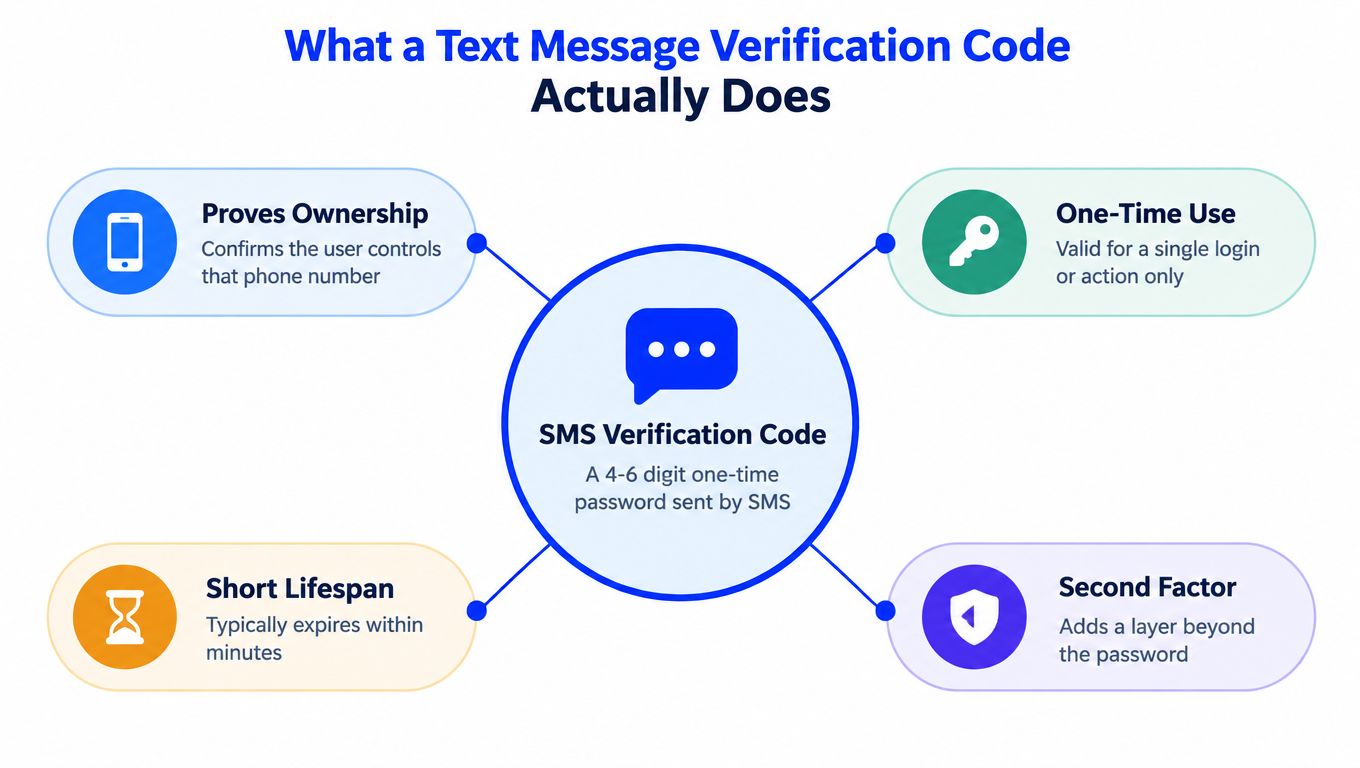
A text message verification code is a short numeric one-time password, or OTP, delivered by SMS. Services commonly use a code with four to eight digits, and a typical example is a six-digit sequence. The code proves that the person completing the action can receive messages at a particular phone number. It doesn't prove ownership of the entire account by itself.
The service generates the code on its server, links it to a session or requested action, and accepts it once within a short validity window. That same pattern can confirm a new signup, approve a login, support a password reset, or authorize a sensitive change, such as adding a bank recipient. The exact action depends on the platform's security design.
A verification code isn't the same as a marketing SMS, a delivery alert, or a push approval. Marketing messages promote something, transactional alerts report an event, and push prompts ask the user to approve an action inside an app. An OTP is a temporary secret that the user must enter into the service that requested it.
For a broader introduction, the SMS Activate verification guide offers useful background on how services use phone-based checks. The practical question is more specific: what should a user do when the code is unexpected, missing, or no longer valid?
Practical rule: A code should be entered only on the official service that requested it. It should never be forwarded to a caller, support contact, or message sender.
How the SMS Verification Code Flow Works in Practice
The process looks simple, but several systems must cooperate.
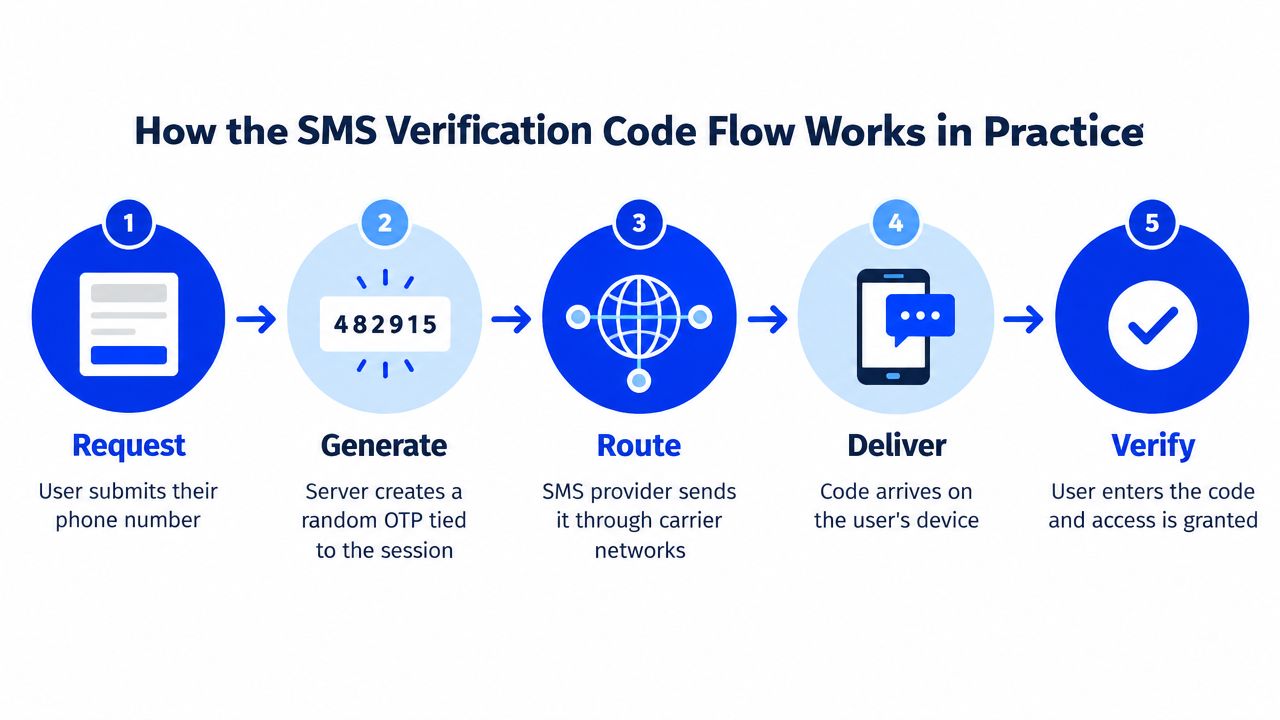
- Request: The user enters a phone number into a signup, login, recovery, or security-change form.
- Generation: The service creates a random OTP and associates it with the relevant session and action.
- Routing: An SMS provider sends the message through carrier networks to the destination number.
- Delivery: The carrier delivers the plain-text message to the user's handset, assuming the number, route, device, and filtering controls all cooperate.
- Verification: The user enters the code, and the service checks whether it matches, remains valid, belongs to that session, and hasn't already been used.
Technical implementations commonly use short validity windows, resend controls, and attempt limits. Guidance for SMS OTP systems describes code lengths of 4-8 digits and expiration commonly set to 1-10 minutes, with retry limits and backoff helping reduce abuse and unnecessary lockouts. These implementation practices are discussed in the UK National Cyber Security Centre guidance on protecting SMS messages.
A service may send from a short code, a long number, or an alphanumeric sender ID. The visible sender can vary by country and carrier, so a familiar-looking name isn't proof that a message is genuine. Geographic routing, filtering, congestion, and anti-fraud rules can affect delivery, while some phones surface OTP suggestions above the lock screen without changing the underlying SMS process.
SMS verification services can be relevant to legitimate signup and testing workflows, but they don't change how the requesting platform validates the code. A delayed message remains a delivery problem, not evidence that the code is invalid.
Security and Privacy Trade-offs of SMS Verification
SMS is convenient because most mobile phones can receive text messages without an additional authentication app. That accessibility explains its lasting role in consumer signups and logins. An industry summary reports that SMS-based 2FA use rose from 28% in 2017 to 53% in 2019 and 79% by 2021, a 51-point increase over four years (Eftsure's two-factor authentication statistics).
Convenience isn't the same as strong security. SMS messages aren't encrypted end to end, and an attacker may exploit carrier-account weaknesses, SIM swaps, signaling-network weaknesses such as SS7, or a real-time phishing page that asks for the arriving code. The Mozilla guidance on OTP authentication therefore treats SMS as materially weaker than app-based authenticators and recommends it for lower-risk confirmation rather than as the only protection.
| Risk | How It Happens | Practical Impact |
|---|---|---|
| SIM takeover | An attacker persuades a carrier to move the number to another SIM | Codes may reach the attacker instead of the account holder |
| Network interception | Weaknesses in mobile signaling or carrier systems expose the message | A code can be captured even while the legitimate phone remains active |
| Phishing relay | A fake sign-in page requests the real code as it arrives | The attacker may use the code during the same session |
| Number exposure | The service receives and stores the phone number used for verification | The number becomes part of that service's account and data records |
Security advice cited in an academic review says CISA recommended, “Do not use SMS as a second factor for authentication,” because SMS isn't encrypted and can be intercepted if an attacker reaches a telecom provider's network (NDSS research on SMS OTP insecurity). SMS still has a place where broad compatibility matters, but high-value accounts should use passkeys, authenticator apps, or hardware security keys where available. A general definition and use-case explanation appears in the text message verification code guide.
When a Verification Code Does Not Arrive or Expires
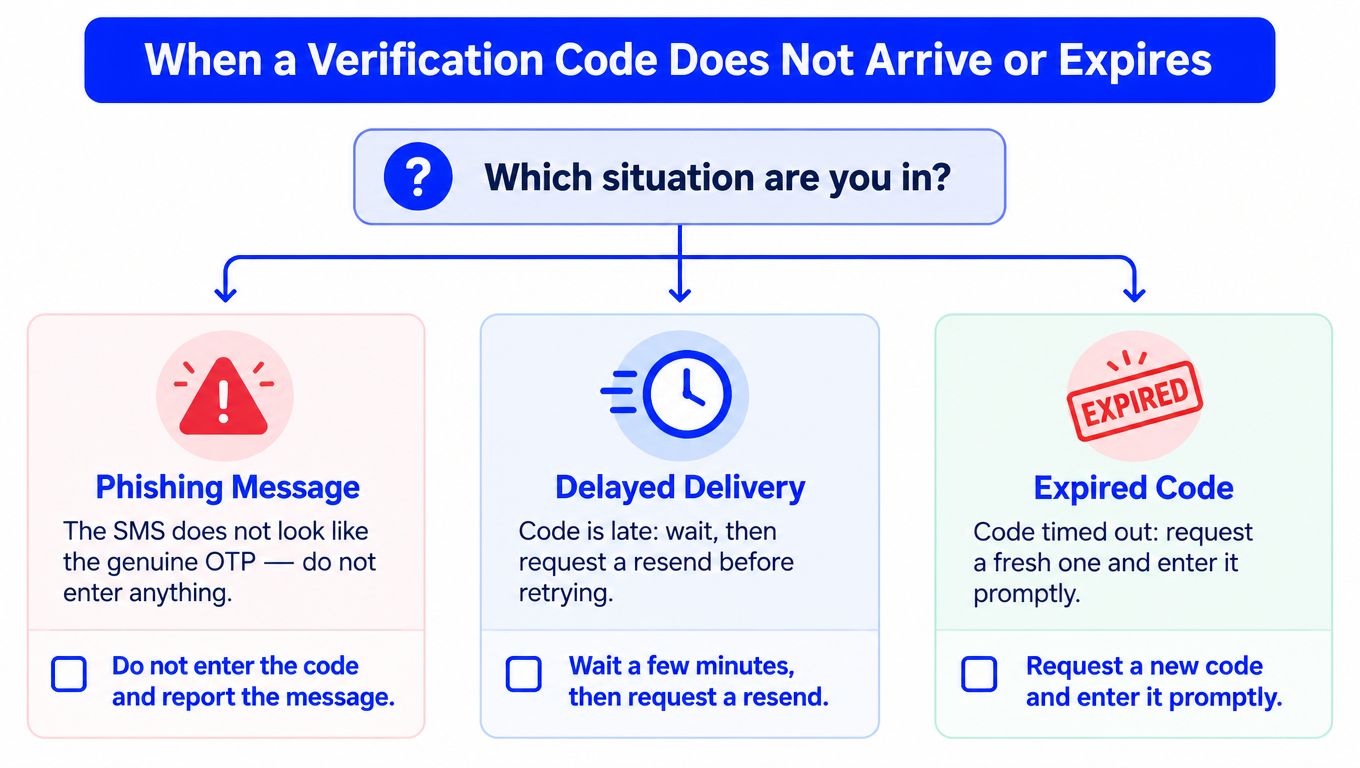
A missing code needs classification before troubleshooting. The text alone usually can't establish why it was sent, so three possibilities must remain separate:
- Phishing message: The SMS asks for the code through a link, a reply, or a person claiming to represent the service. Don't enter or share anything.
- Attempted login: Someone may be trying to sign in to an account, but the code is being sent to the account's real phone number. The recipient shouldn't share it or approve an unfamiliar request.
- Mistyped or outdated number: The user may have entered the wrong number during signup, or an existing account may still be tied to an old number. A new number won't recover an existing account connected to the previous one.
For a genuine request, use this order:
- Confirm that the action was started on the official website or app.
- Check the displayed phone number carefully, including its country code.
- Wait through the service's stated validity period before requesting another code.
- Check signal, airplane mode, blocked senders, and any spam filtering used by the phone.
- Request one fresh code, then enter the newest message promptly.
- Stop repeated requests if the service shows a rate-limit warning or temporary block.
Carrier filtering, congestion, regional outages, inbox storage limits, and request limits can all delay delivery. One recent overview notes that 10-15% of SMS OTPs may never reach recipients (Mailbird's verification-message troubleshooting guide), so the failure isn't necessarily user error.
Signup flows may offer a simple resend button. Recovery flows can expose email confirmation, backup codes, an authenticator, or an official support process instead. If the number is wrong, changing it helps with a new signup but doesn't restore access to an existing account. Contact the platform directly when the displayed number is correct, fresh requests fail, or a security alert suggests unauthorized access. More practical delivery options are outlined in the guide to receiving SMS verification codes.
Comparing SMS Codes With Built-in 2FA, Apps and Voice Calls
The right method depends on the account's value, the user's recovery options, and what the platform supports. SMS often has the broadest acceptance, but it relies on a carrier and is weaker against SIM-based attacks than cryptographic methods.
| Method | Reliability | Security vs SIM swap | Recovery without device | Phone number privacy | Platform support |
|---|---|---|---|---|---|
| SMS code | Familiar, but affected by carrier delivery and filtering | Weaker, because the code travels through mobile networks | Depends on the platform's recovery flow | Requires a phone number | Widely supported |
| Built-in 2FA | Depends on the account ecosystem and device | Usually stronger when based on passkeys or device-bound approval | May include recovery codes or trusted devices | May reduce SMS use | Limited to supported ecosystems |
| Authenticator app | Works without mobile reception after setup | Stronger than SMS against SIM swaps and interception | Requires transfer, backup, or recovery codes | Phone number may not be needed | Supported by many major services |
| Voice call | Useful when SMS isn't reliable, if the platform offers it | Still depends on the phone network and number | May help when texts fail, but not when the number is unavailable | Number remains involved | Separate support is required |
| Dedicated verification number | Useful for a specific temporary workflow | Not a security upgrade for a valuable personal account | Poor fit for long-term recovery unless access is retained | Keeps a personal number out of one workflow | Virtual and restricted ranges may be blocked |
Microsoft documents that SMS and voice verification are separate methods. SMS sends a code for entry into the sign-in interface, while an automated call asks the user to press # on the keypad (Microsoft's phone authentication options). Voice is therefore a fallback channel, not automatically a safer factor.
Authenticator apps generate codes on the device rather than sending them through a carrier, but setup and recovery require planning. Passkeys and hardware keys can provide stronger protection, though platform support and account-recovery rules vary. A temporary number can protect privacy during a one-off signup, but it shouldn't replace a long-term recovery method controlled by the account owner.
Where LineVerifier Fits in Real Verification Workflows
LineVerifier fits a narrow category: a paid service that lets a customer select a supported service and country, review the current offer and price, and use a disposable or dedicated number to receive an SMS verification code in a dashboard. It is not a permanent personal phone line, and receiving an SMS doesn't imply that the number supports voice calls.
That distinction matters because the same number has different value in different workflows.
- One-off signup: An individual may prefer not to expose a personal number during a supported account creation flow.
- Regional testing: A marketing or growth team may test a legitimate signup experience across supported countries, with appropriate authorization.
- Client administration: An agency may manage several authorized client workflows where each account needs a verified contact.
- Prototype testing: A developer may use a number while evaluating an SMS step in a prototype or automated test.
The service may be useful for receiving a code, but it doesn't control the platform that sends it. Some platforms block virtual, VoIP, temporary, or previously used number ranges. There is no guarantee of acceptance, delivery, account access, or continued availability, and the offer's number type, price, access duration, and refund eligibility depend on the selected offer and current terms.
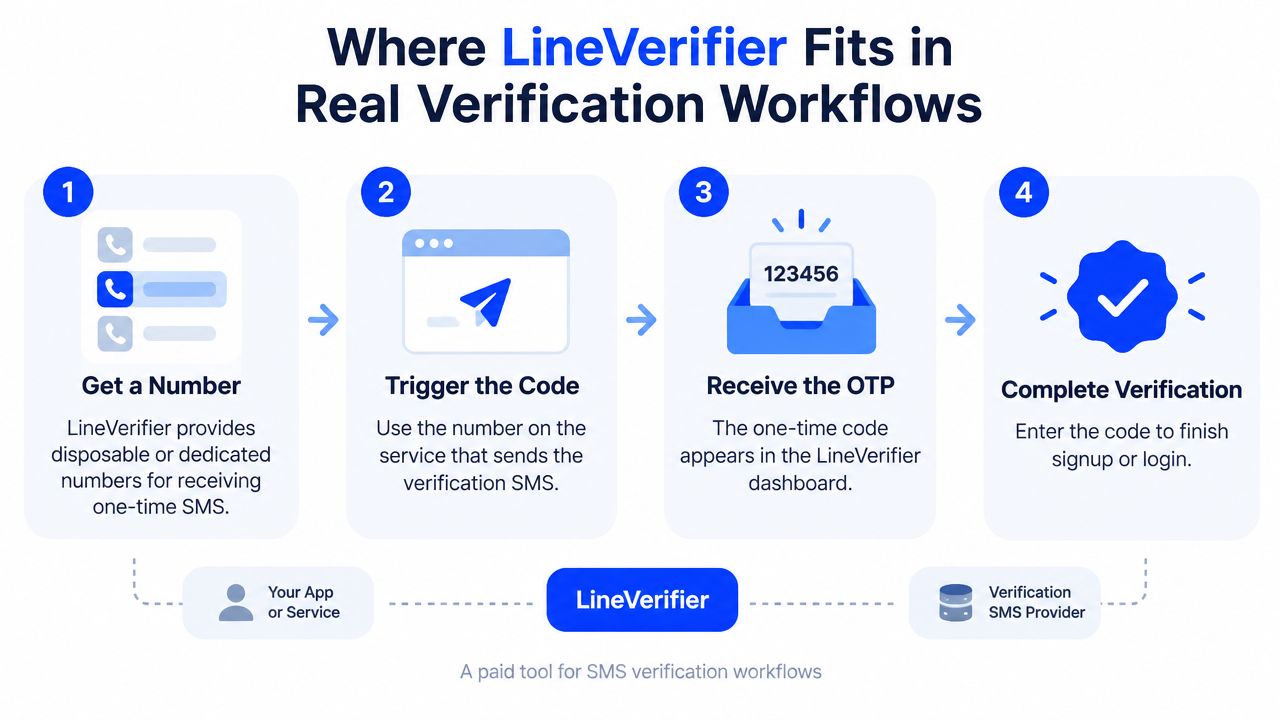
A different new number doesn't recover an existing account tied to its previous number. For a personal account that may need future password resets or security changes, an authenticator, recovery email, backup code, or trusted long-term number is usually more appropriate. LineVerifier is a workflow utility, not a security upgrade, and it shouldn't be used as the sole 2FA method for a high-value account.
Choosing the Right Verification Path for Your Situation
Before paying for any number, the account owner should exhaust official options. Those may include a built-in authenticator, recovery codes saved during setup, a carrier PIN, a trusted device, or the platform's account-recovery process.
The decision becomes clearer when the purpose is stated precisely:
- New account creation: A dedicated verification service can be reasonable when the number is needed only as a one-time identifier, the platform supports the selected offer, and the user accepts that the platform may reject it.
- Existing-account recovery: Use the platform's official recovery route. A new number won't substitute for the old number already attached to the account.
- Multi-account or testing workflow: A service may fit when the organization has authorization, needs separate verification contacts, and can retain any recovery methods required later.
- High-value personal account: Prefer a passkey, authenticator app, hardware key, backup codes, or a long-term number controlled by the account owner.
Google recommends a recovery phone that can receive texts, belongs only to the user, and is used regularly. It specifically warns against using a Google Voice number as a recovery phone because losing access to that number could lock the user out (Google's recovery-phone guidance). Google also says a changed recovery number may take up to seven days to take effect, while codes may still go to previous recovery information during that period.
A useful privacy comparison should also consider non-SMS checks. For example, services using browser-based verification may apply an invisible browser check from MANDATE, which is a different verification mechanism from receiving an OTP by phone.
Three questions usually settle the choice:
- Is the task a new account, recovery, or an authorized multi-account workflow?
- Is the phone number a permanent identifier or a disposable one?
- Is the accepting platform likely to block virtual or restricted number ranges?
Decision rule: Use a controlled, long-term recovery factor for accounts that matter later. Use a temporary verification option only when the workflow is genuinely temporary and the platform's rules allow it.
LineVerifier provides supported temporary or dedicated numbers for receiving SMS verification codes through its dashboard, with availability and terms shown for the selected offer. Readers comparing that workflow with their situation can visit LineVerifier to review the current supported services, countries, prices, and applicable conditions.