.png&w=384&q=75&dpl=dpl_4LaKVgMDgXFAWjUxtUQQSP7dGFic)
Tinder Verify Number Guide for SMS Setup
A new Tinder install can leave someone staring at a code-entry screen, while a returning user may be locked out after losing the phone number connected to the account. Both situations involve a Tinder verify number step, but they aren't the same problem. One confirms access to a phone line for a new login or signup. The other requires account recovery and proof that the person still controls the original account.
The practical rule is simple: use Tinder's official SMS flow for a new verification, and use Tinder's recovery process when the number has changed. A temporary number can fit a one-time setup, but it doesn't restore an existing account, override a ban, or create a permanent recovery method.
What Tinder Verify Number Actually Does and Does Not Do
Tinder phone verification asks the user to enter a working number and then type the one-time SMS code sent to that line. The code demonstrates control of the phone, number, or SMS channel at that moment. Tinder's own documentation says a user signing in with a phone number must complete SMS verification, and another person can't successfully access the account without the relevant phone access or code. See Tinder's official phone and email verification guidance for the account-level rules.
That check is useful, but limited. It isn't background identity proof, it doesn't replace photo verification or an identity check, and it doesn't prove that the account holder's profile information is accurate. A code also doesn't recover an existing account on a new number by itself. If the old number is gone, the user needs the email linked to the account or the original Apple or Google login, followed by Tinder's recovery steps.
Three paths cover most situations:
- Official SMS verification: A new or existing user enters a reachable number and the code Tinder sends.
- A paid temporary number: A possible option for a legitimate new setup when the user doesn't want to use a personal line, subject to the provider's terms and Tinder's acceptance.
- Account recovery: The correct route after a number change, lost SIM, or login problem involving an existing profile.
Tinder also limits reuse. Its help center states that an email address and/or phone number can be verified on only one Tinder account at a time. That means a number already attached to another profile can trigger a verification problem, even when the person currently controls the SIM.
Practical rule: A verification number proves access to a line now. Long-term account access depends on recovery methods the account owner continues to control.
How Tinder Verification Fits With Login and Photo Checks
Tinder uses several separate signals, and confusing them causes avoidable account loss. SMS verification proves that a person can receive a code on a particular phone line. It functions as an account-security and anti-abuse measure, but it isn't a complete identity check.
Email or Apple and Google login provides the durable account handle when a phone number changes. Tinder's documented recovery path tells users who have changed numbers to select Trouble Logging In?, enter the email linked to the account, and verify a new reachable number. A different number without that original account connection normally starts a new registration rather than reopening the old profile.
Photo verification serves a different purpose. Selfie prompts and profile-photo checks help establish a trust signal for people viewing the profile, while SMS handles access to the account. They shouldn't be treated as interchangeable. Readers building a broader verification workflow can also review how to set up identity checks, but a separate identity system doesn't replace Tinder's own login requirements.
Tinder Identification Layers at a Glance
| Layer | What It Proves | Role in Recovery |
|---|---|---|
| SMS code | Access to a specific phone line | Confirms the new or existing number |
| Email or Apple and Google login | Connection to the account record | Helps recover an account after a number change |
| Photo verification | A separate profile trust signal | Doesn't replace login verification |
Swapping a SIM, purchasing a new number, or moving to another device doesn't transfer the account automatically. Tinder treats the phone number as an account-level identifier, and its documentation says a number can be tied to one verified Tinder account at a time. The safest approach is to preserve the original email or social login before changing the phone line.
Running the Standard SMS Verification Flow on Mobile and Web
A new signup and an account recovery attempt can look similar on screen, but the number has different consequences in each case. Tinder's standard flow starts from Sign up or Log in. Select the phone option, choose the correct country code, enter the number, and request an SMS. Tinder then shows a field for the one-time code sent to that line.
Use the country selector Tinder provides. Do not paste a second country prefix or add stray spaces. The code confirms possession of that phone line, not ownership of an older profile. Entering a different number during recovery may lead to a new registration, while an account linked to another Apple ID or Google account may open a different login route.
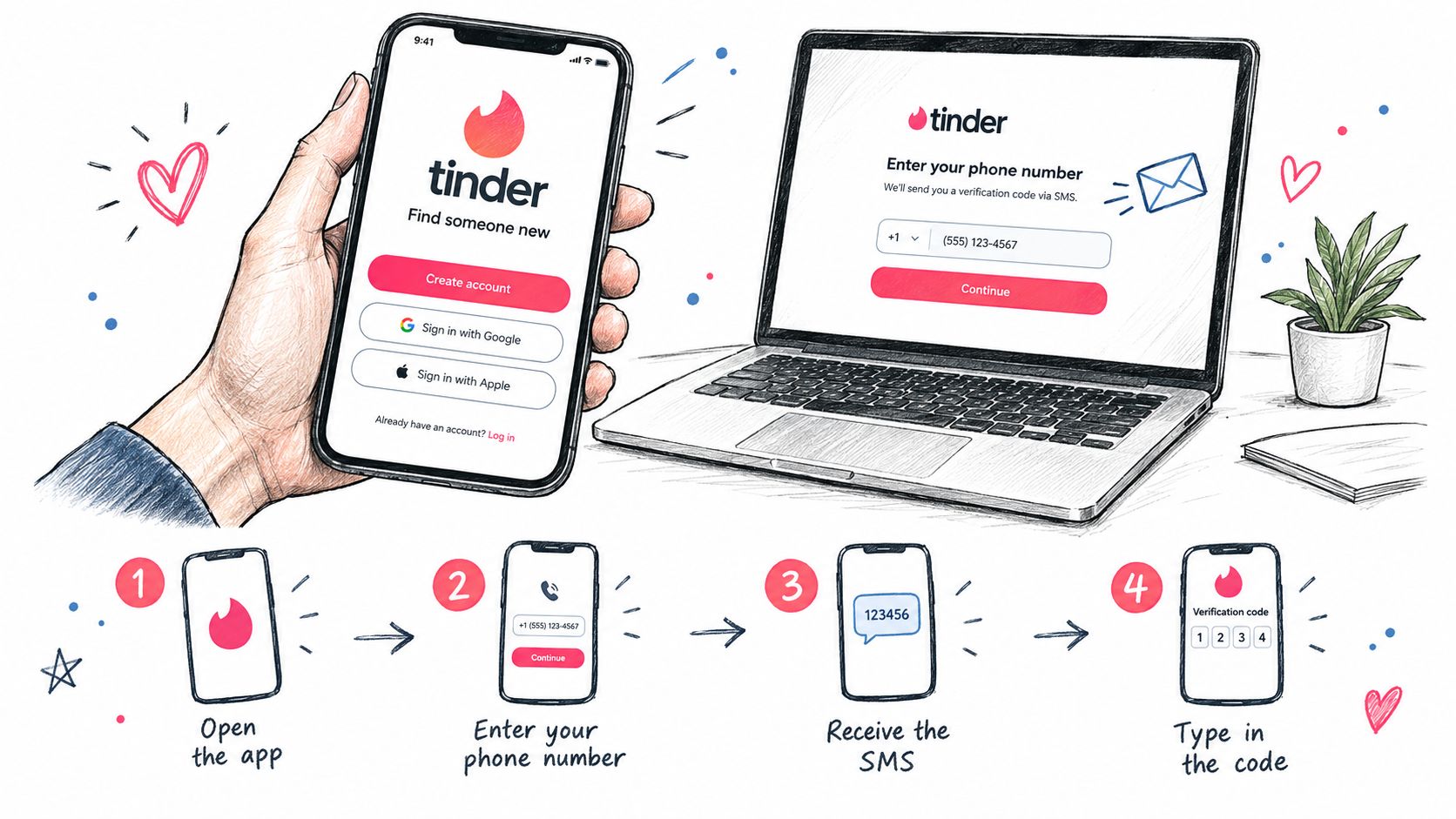
If the SMS does not arrive, wait for the available cooldown, then use Resend code beside the code field. Each new request can make an earlier code invalid, so repeated taps can leave you testing an outdated message. Check signal, blocked senders, and message filters before requesting another code. Enter the newest code received.
Tinder.com uses a similar signup and login process on desktop. The browser may send the user to the mobile app through a deep link to complete verification. A paid or temporary number may work for a one-time new signup, but it creates recovery risk if access to that line ends. For an existing account, preserving the established login connection matters more than obtaining another SMS code.
Choosing the Right Type of Verification Number
The right number depends less on speed and more on what the account needs after signup. A personal mobile line offers the clearest long-term recovery path, but it connects the Tinder account to a real personal identifier. A secondary eSIM can separate dating activity from a primary line without requiring another handset, although it still remains tied to a carrier relationship and may have its own renewal terms.
Free VoIP numbers and public online SMS pages are poor choices for sensitive account setup. Their access may be shared, their numbers may have prior use, and Tinder may reject unsupported number types or numbers with a reuse history. That doesn't mean every online number fails, but it does mean the user shouldn't assume that a visible inbox will be accepted.
A paid non-VoIP verification number can be useful for a single-purpose new signup when privacy matters more than permanent recovery. LineVerifier's relevant non-VoIP number guidance helps distinguish mobile-type SMS access from a permanent personal phone line. The selected offer's access duration, number status, and refund terms still control what happens if the code doesn't arrive.
| Number Type | Control | Recoverability | Privacy | Cost | Typical Use |
|---|---|---|---|---|---|
| Personal mobile | Strong control through a carrier | Strong while retained | Lowest separation from identity | Ongoing carrier cost | Long-term account |
| Secondary eSIM | Carrier-based control | Depends on keeping the line active | More separation than a primary number | Ongoing carrier cost | Secondary personal account |
| Free VoIP or public SMS | Often limited or shared | Weak | High separation, higher exposure | Free or low cost | Testing, not dependable account recovery |
| Paid verification number | Depends on the offer terms | Usually limited after access ends | Separates the primary number | Paid per selected offer | One-time SMS verification |
A paid number doesn't prevent bans, moderation decisions, identity checks, or community-guideline enforcement. Premium status also doesn't make a number permanent. If the account matters over time, a personal or retained secondary line is safer for recovery.
Using a Paid Verification Service for a Tinder Number
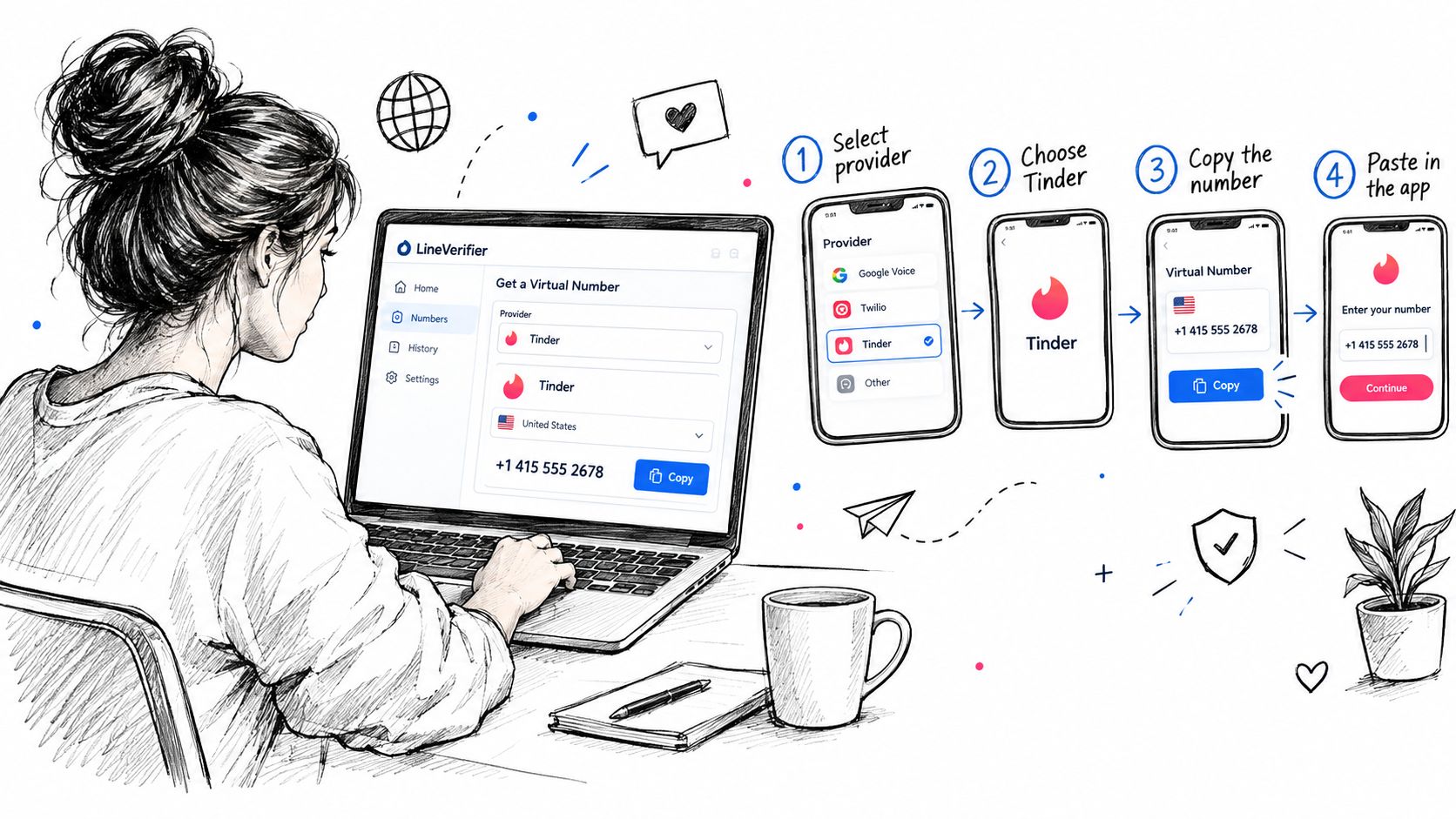
A paid service should be treated as an optional tool for a new verification, not as an account-recovery shortcut. On a provider dashboard, the user generally selects Tinder, chooses an available country, reviews the number offer, and checks whether the line is mobile-type rather than VoIP. The provider's live page controls availability, price, access duration, and any refund eligibility.
Before payment, the important questions are practical:
- Access window: How long can the user view incoming SMS for the selected offer?
- Number status: Is the line private, shared, rented, or intended for a single activation?
- Refund terms: What happens if Tinder's message never arrives or the platform rejects the number?
- Reuse rules: Does the offer permit another verification, or is it intended for one activation only?
After selecting an offer, the user copies the issued number with its country prefix, enters it in Tinder's phone field, and waits for the SMS in the provider dashboard. The six-digit code must then be entered into Tinder. Receiving the message only confirms delivery. Tinder can still reject the number, request additional checks, or enforce its rules on the resulting account.
This workflow resembles other verification integrations where a service receives a code and passes it into an application. Developers comparing those patterns can consult Mailbeam's integration guide for email verification API, while individual Tinder users should follow Tinder's own interface and support rules.
LineVerifier's temporary phone number guide is relevant when the need is limited to receiving an SMS during a new setup. It doesn't promise acceptance, bypass a ban, defeat a CAPTCHA, satisfy an identity check, support voice calls, or provide a permanent line. A user who chooses this route should add and retain an account recovery method that remains under personal control.
Fixing Common Tinder Verification Errors and Missing Codes
A missing Tinder code can reflect a bad number, incorrect country routing, carrier filtering, or too many resend attempts. Tinder also limits an email address or phone number to one account at a time. A number attached to another profile may therefore fail even when the SMS itself arrives.
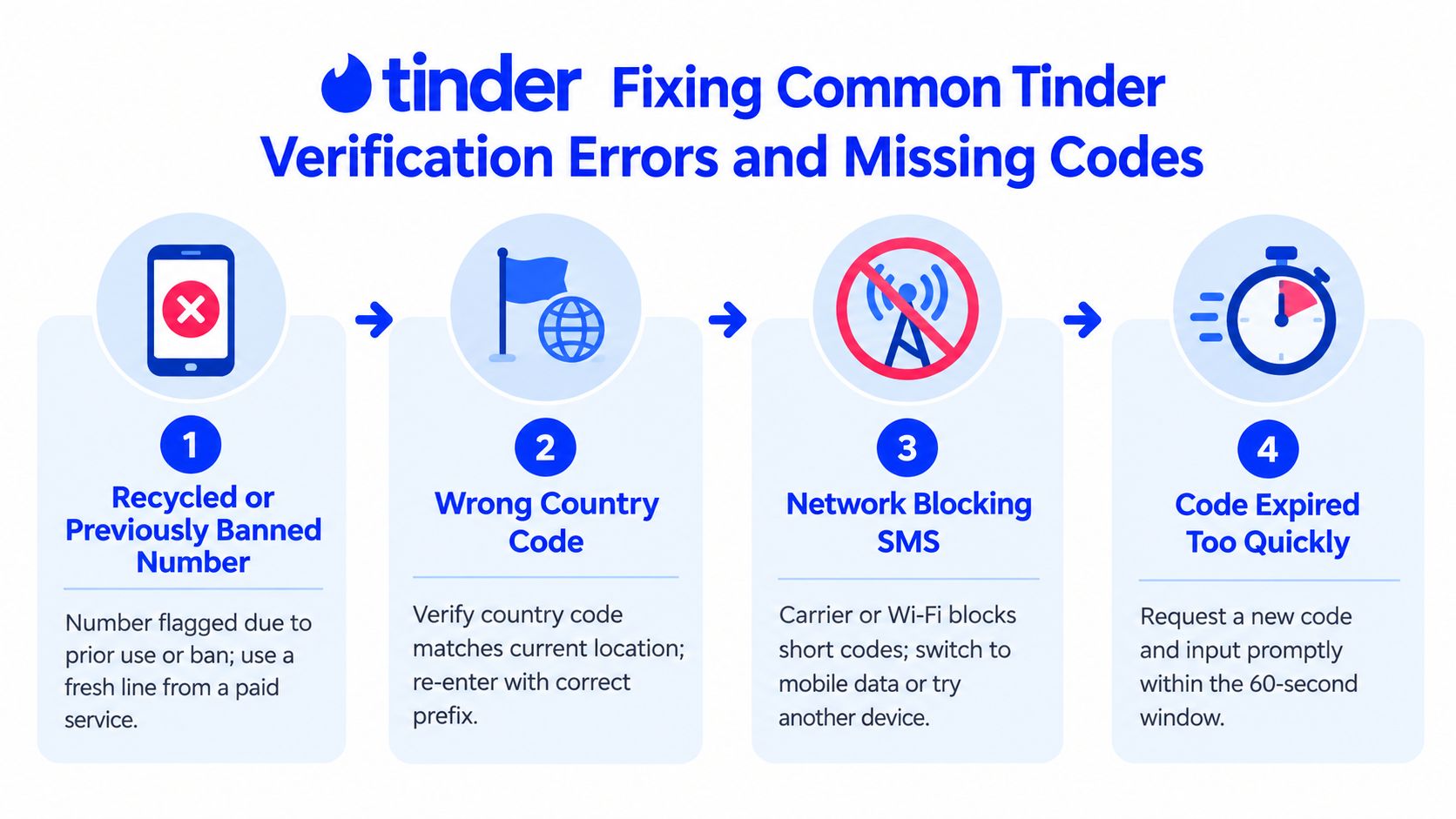
Start by checking the number's history. Recycled lines can trigger an invalid-code message or stop delivery altogether. Free public SMS pools create the same problem, since users cannot control prior account use or who can read incoming messages. Stop using a rejected line and request a different provider offer. For delivery troubleshooting steps, see how to receive SMS verification code.
Match the failure to the fix
- Wrong country code: Reopen Tinder's country selector and compare its prefix with the provider's number. A mismatch can send the request through an unintended carrier.
- Network or carrier filtering: Switch from Wi-Fi to mobile data, confirm that the SIM receives other short-code messages, and avoid unsupported VoIP ranges.
- Expired or replaced code: Wait for the resend option, request one new code, and enter the latest message promptly.
- Too many requests: Stop repeated attempts. Continued retries make the cause harder to isolate. Waiting before contacting support is more useful than repeatedly submitting the form.
A stale app session may clear after reinstalling Tinder, but reinstalling cannot fix a number-account mismatch. If the original account matters, prepare the account email, country code, approximate request time, device details, and a clear description of the failure before using Tinder's official support route. Support is a better recovery path than creating another account, especially when SMS-code access may determine whether the profile remains recoverable.
Businesses handling verification and payments can also review guidance on how to secure your Shopify revenue. Those controls do not change Tinder's phone requirements or guarantee acceptance of a number.
Recovering an Existing Account and Best Practices Going Forward
A changed number calls for recovery, not a fresh signup. Tinder's official instructions say to open Tinder or Tinder.com, choose Log In, select Trouble Logging In?, enter the email linked to the account, and then verify the new phone number to continue. Tinder also provides a phone-number update route in account settings, where the new number must be entered and confirmed by SMS.
The original email or Apple and Google login matters because a new phone number doesn't identify the old profile on its own. If self-service fails, the user should contact Tinder support through the official help flow and provide account details that establish ownership. A third-party number may receive a new verification code, but it can't transfer another person's account or independently restore a profile tied to a lost number.
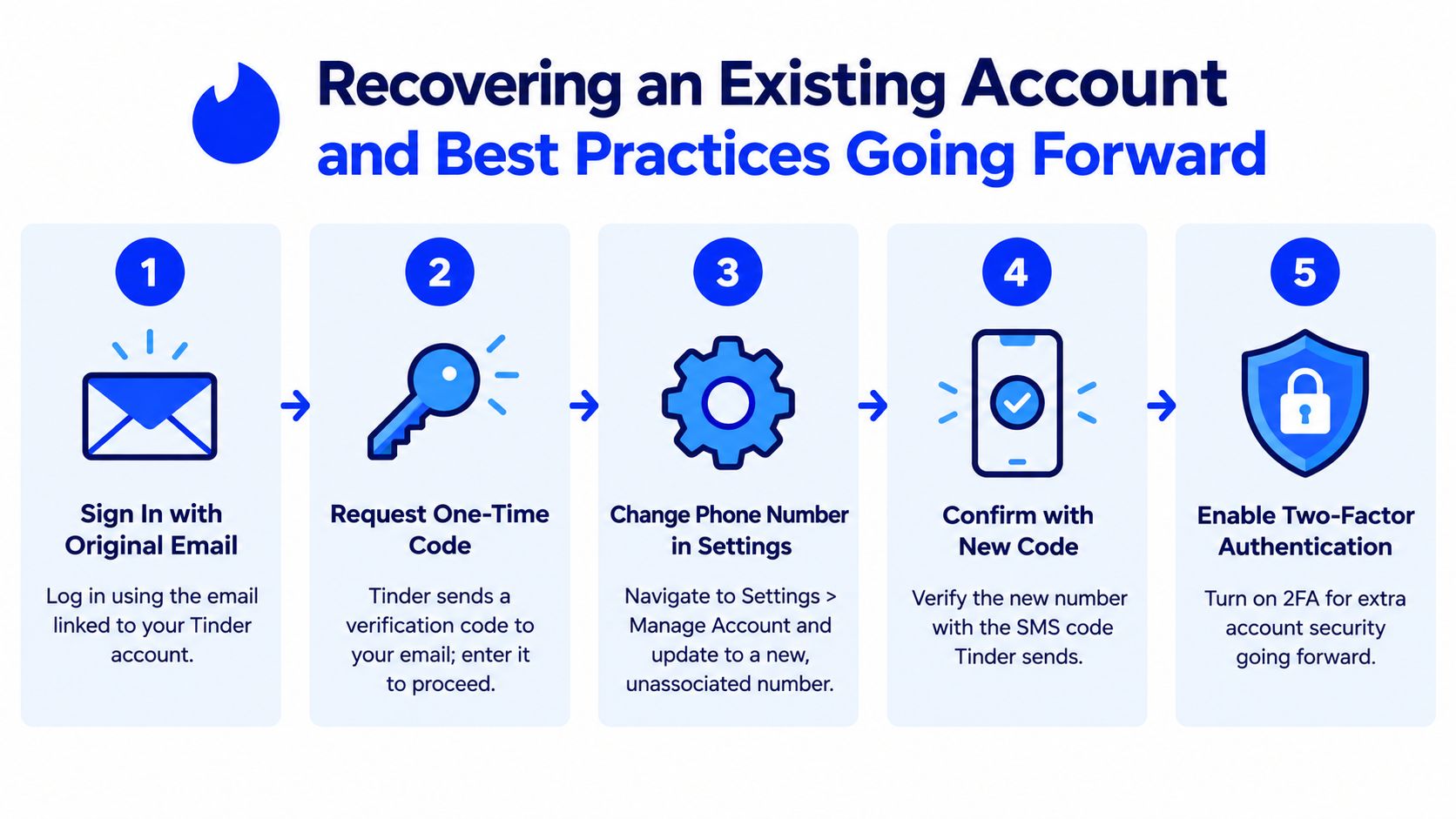
Preserve access after the change
Keep the recovery email current and retain control of the replacement number. Avoid rapid SIM changes that leave no reachable number, and don't reuse a line already associated with a banned or inaccessible profile. Separate legitimate personal and secondary accounts with distinct Apple or Google sign-ins where appropriate, while following Tinder's account rules rather than trying to evade enforcement.
Privacy choices should be deliberate. Review Tinder's app permissions, disable precise location if it isn't needed, and remove SMS history from a shared device after the code has been used. Those steps reduce local exposure, but they don't replace account recovery or make a temporary number permanent.
LineVerifier provides paid SMS verification offers where users select a supported service and country, review the current number and access terms, and receive incoming codes through its dashboard. Visit LineVerifier only when a temporary number fits a legitimate new Tinder setup, and retain a recovery method you control for any account that needs long-term access.