.png&w=384&q=75&dpl=dpl_4LaKVgMDgXFAWjUxtUQQSP7dGFic)
Phone Numbers for Gmail Verification: A Practical Guide
You're staring at a Gmail verification prompt, the old SIM is unavailable, and the replacement number keeps getting rejected. The immediate goal appears simple, receive the SMS code. The key decision is more important: will that number still help when Gmail challenges the account later?
A number used for Gmail verification can become part of the account's sign-in and recovery architecture. A temporary, shared, or inaccessible line may receive one message and still leave the account exposed when a password is forgotten, a device is lost, or Google asks for another verification signal. The practical rule is straightforward: choose the number for the next recovery problem, not only for the next code.
Why the Right Phone Number Matters More Than the Code
The code proves that a message reached a number at that moment. It doesn't prove that the account owner will control that number next month, after a SIM swap, carrier change, international trip, or provider shutdown. Google's account guidance says a recovery phone should be a mobile number that can receive text messages, belong only to the account owner, and be used regularly. A number that satisfies only the first condition is a weak foundation.
The distinction matters because verification and recovery are different jobs. New-account verification may ask for a number during sign-up. Recovery uses contact details and account signals already associated with the account. Google's recovery instructions ask for the phone number or recovery email previously linked to the account, so a different new number doesn't automatically restore access to an existing Gmail account. Google's account recovery guidance makes that limitation clear.
Practical rule: A verification number should be treated as account infrastructure, not disposable inbox equipment.
Mobile access is widespread, but it isn't universal or equally dependable. The International Telecommunication Union's 2024 mobile ownership data reported that 80% of people aged 10 and over owned a mobile phone globally, compared with 56% in low-income economies and more than 95% in high-income economies. The same release recorded 66% mobile phone ownership in Africa and 38% internet use, showing why a working mobile number can be easier to obtain than stable broadband while access gaps remain serious.
The best default is a personally controlled mobile number that can receive SMS reliably in the country where the account will be used. A separate recovery email should be added at the same time. That pairing gives the account owner more than one route when the original phone isn't available.
Choosing a Number Type That Gmail Will Accept
Number type affects both initial acceptance and future access. A regular mobile line from an established carrier is the safest choice because it normally supports text messages, may offer voice fallback, and remains tied to a customer-controlled SIM. Carrier brands vary by country, so the relevant test is ownership and reachability, not a particular logo.
A landline is a poor fit for an SMS prompt. A voice route may sometimes appear, but Google doesn't guarantee that the flow will offer it. VoIP and business numbers can behave inconsistently, especially when the account, device, location, or network context changes. Public SMS websites and shared virtual numbers are particularly unsuitable for accounts that need lasting recovery, because other users may have accessed the same line and the number may already have been associated with many accounts.
| Number Type | SMS Support | Voice Fallback | Google Acceptance | Long-Term Reliability |
|---|---|---|---|---|
| Personally controlled mobile | Usually suitable | Often available through the carrier | Strongest practical option | High while the line remains active |
| Dedicated prepaid or second SIM | Suitable if SMS is enabled | Depends on carrier | Often reasonable | Depends on top-ups and continued ownership |
| Standard VoIP number | Inconsistent | Provider-dependent | May work, may be refused | Weaker for security challenges |
| Landline | Not suitable for SMS | Possible only if offered | Uncertain | Poor fit for SMS recovery |
| Public or shared SMS number | Unreliable | Usually unavailable | Frequently rejected or challenged | Unsuitable |
Google's requirements and fraud controls can change the result even when a number receives ordinary texts. Anyone comparing mobile and non-mobile options should review the practical differences between non-VoIP numbers before entering a number into Gmail.
A number that has been used too many times is another common failure point. Google may limit repeated account verification with the same number. The error isn't necessarily evidence that the number is broken. It may mean the number has reached a platform limit, so repeatedly requesting codes usually wastes time.
Adding the Number and Completing Gmail Verification
For an existing Google Account, the normal path is to sign in, open Security, select 2-Step Verification, and add the phone number in the relevant phone section. Google's official recovery-phone instructions recommend a mobile number that receives texts and belongs to the account owner. Google also says a recovery-phone change can take up to 7 days to take effect, so a newly added number shouldn't be treated as an instant rescue channel.
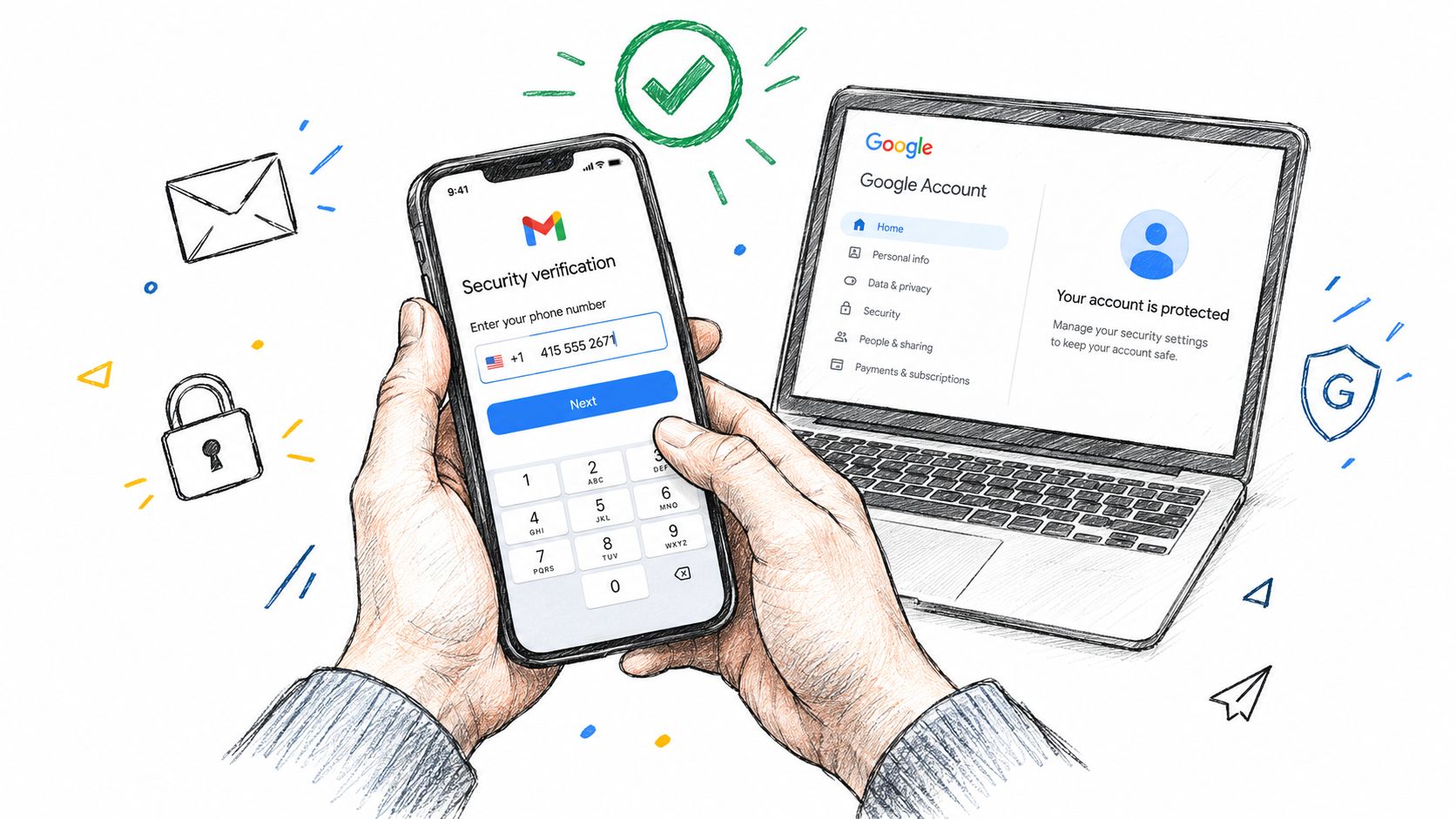
Use the number in the format Google's form accepts for its country or region, confirm that the selected country matches the number, and request the SMS. Google's phone-number setup guidance states that Google sends a verification code after a recovery number is added. If the code doesn't arrive, check the carrier and device before assuming the account setup has failed.
Pair the number with another recovery method
After the code is accepted, add a separate recovery email in the same Security area. The email should be controlled independently from the Gmail account, protected with its own security method, and kept accessible during travel or device replacement.
A brand-new account may ask for phone verification during sign-up. That flow isn't the same as recovering an older account after losing its original number. Readers managing several inboxes may also benefit from guidance on adding another account to Gmail, particularly when separating personal and work identities.
The following walkthrough can help users distinguish a Google Voice setup from a regular mobile-number workflow: create a Google Voice account. Neither guide changes Google's acceptance rules for a specific number type.
Once setup is complete, sign out and test a normal sign-in only when doing so won't interrupt important work. Then return to Google Account Security and confirm that the number appears as an active recovery or verification method rather than assuming the first successful code settled every future challenge.
When a New Number Cannot Save an Old Account
A new number doesn't function as a master key for a locked Gmail account. Google's recovery process looks for evidence connecting the person to the account, including previously associated recovery details and familiar sign-in context. A replacement number can support the process only when Google accepts it as part of that account's established security history.
Adding a number before a lockout is maintenance. Entering a different number after losing access is a recovery attempt, and those situations shouldn't be confused. If the original phone number is gone, Google's recovery flow still relies on the information already connected to the account, including the prior recovery email where one exists.
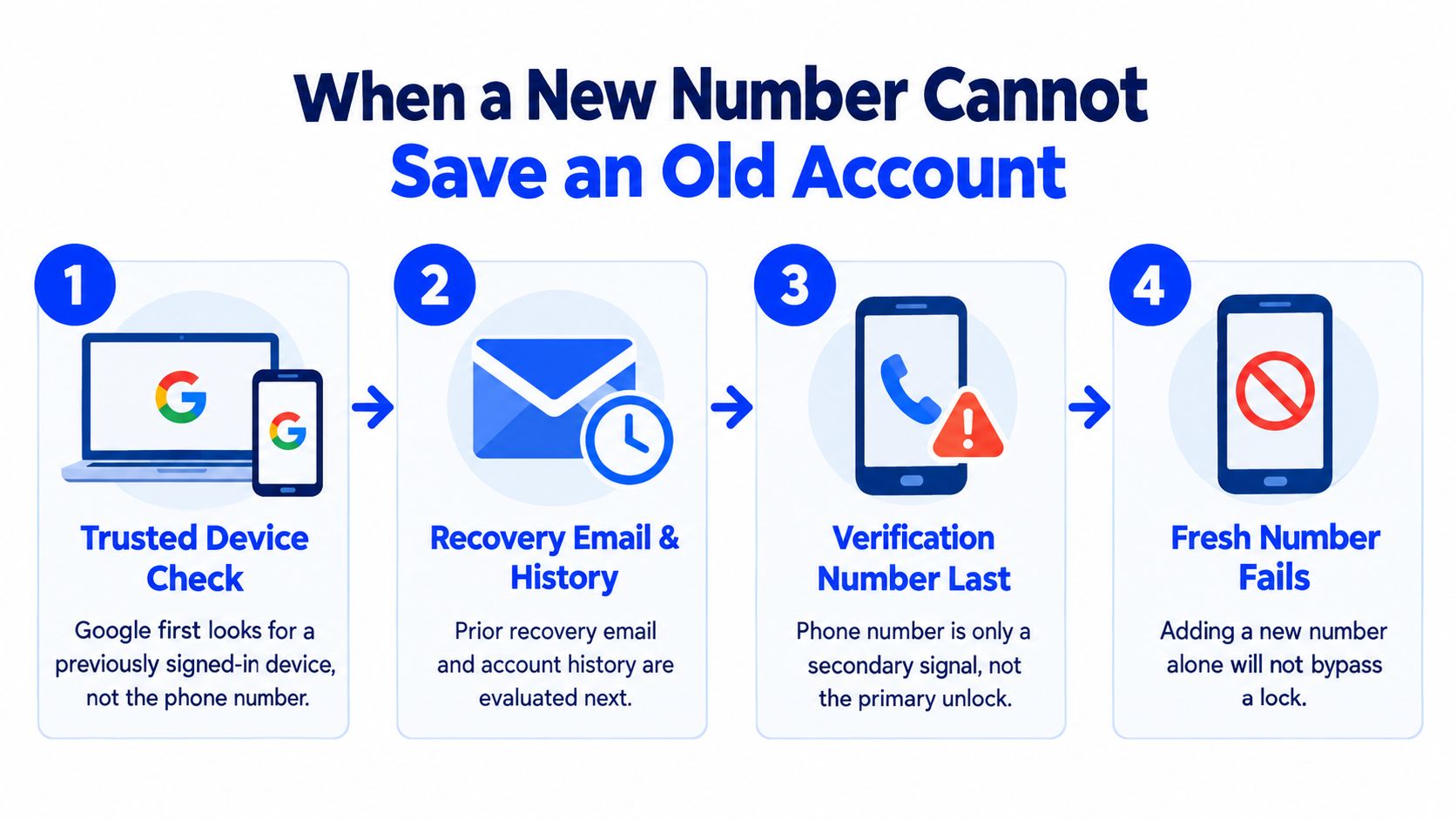
The sensible recovery order is:
- Try a device and browser that previously signed in successfully.
- Use the recovery email or original phone information already associated with the account.
- Follow Google's account-recovery prompts rather than repeatedly submitting unrelated numbers.
- After access returns, add a controlled phone and separate recovery email before another problem occurs.
Google's account recovery help explains why an unrelated new number cannot automatically restore an old account. For readers who need hands-on assistance with a lockout, locked out of Google account help may provide a useful troubleshooting reference, but no external service can promise to bypass Google's identity checks, CAPTCHA, restrictions, or account ban decisions.
Troubleshooting the Most Common Verification Failures
Most failed verification attempts fall into a few recognizable patterns. The first is a missing message. A carrier may filter short-code traffic, the number may be treated as virtual, or Google may decline to route the message under the current sign-in conditions. The practical response is to confirm that the device and carrier support SMS, keep an internet connection active, try the same region where the number is registered, and use a supported fallback if Google offers one. Google recommends prompts over SMS because text delivery varies by location and provider, as explained in its official verification troubleshooting guidance.
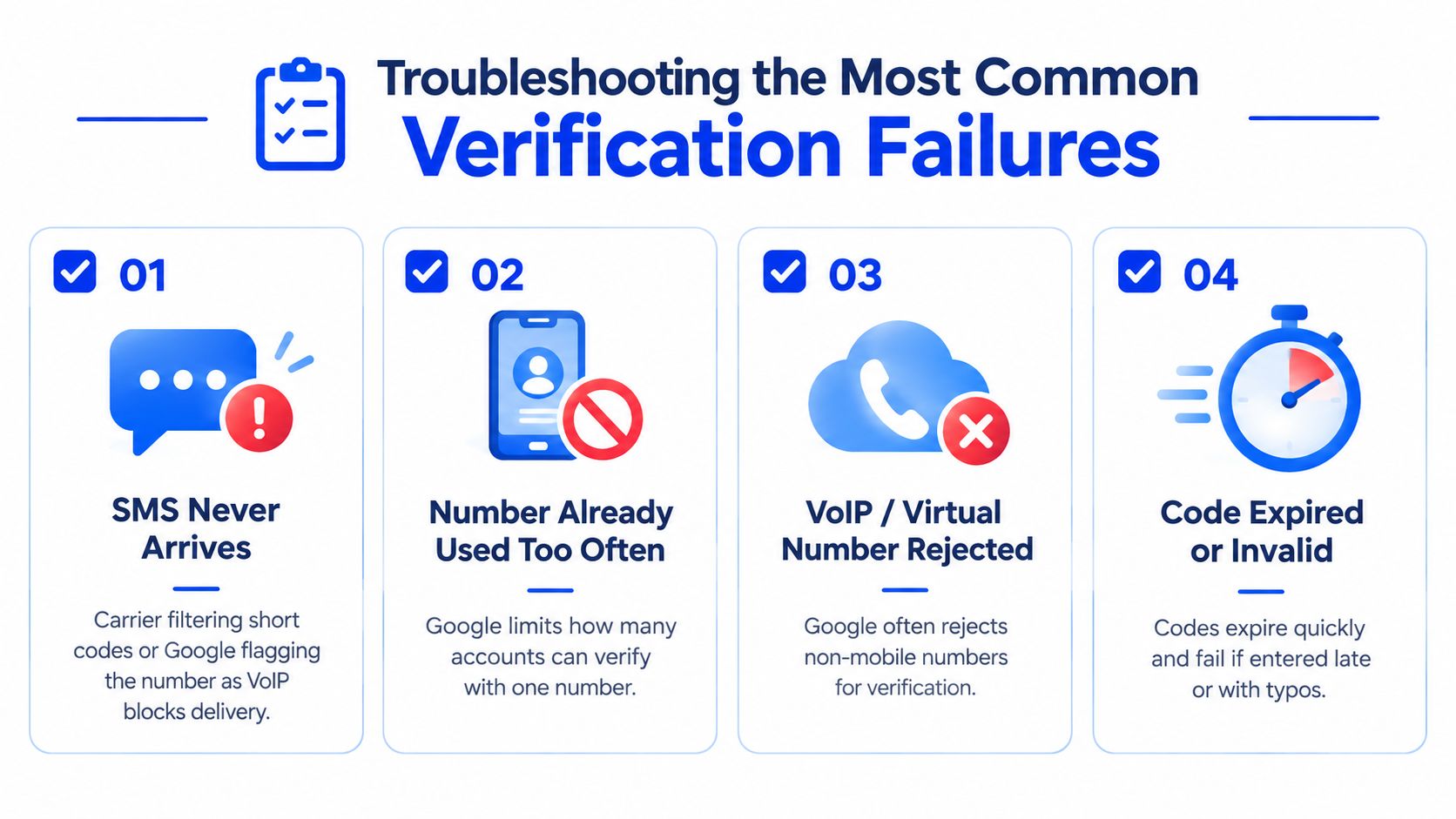
A second failure appears when Google says the number has been used too many times. Repeating the request won't remove that limit. The fix is to use a different eligible number controlled by the account owner, not another public number that may have the same history.
Code rejection has a simpler cause surprisingly often. The user enters an older message, waits too long, copies hidden spaces, or requests several codes and then submits one that is no longer current. The clean procedure is to request one code, enter the newest message manually if copying causes trouble, and avoid sending repeated requests while waiting.
A fourth pattern involves a prompt sent to a device the user no longer owns. That isn't a phone-number delivery problem. The user should select Google's alternative sign-in or recovery path and use an already associated recovery method. Two-Step Verification can also require an authenticator method, security key, or another configured factor. A replacement SMS number won't automatically remove that requirement.
Before abandoning the number, check the carrier, country selection, signal, SMS capability, number history, and whether the account has another verified recovery method.
Free Options, Paid Numbers, and the Privacy Trade-Off
The free option is usually the personal mobile SIM already in the reader's possession. It tends to offer the clearest ownership and the most predictable delivery, but it also connects the phone number directly to the Google accounts that use it. That may be acceptable for a primary account and undesirable for separate identities, testing workflows, or privacy-sensitive registrations.
A second SIM or prepaid mobile line creates separation while preserving ordinary mobile-network behavior. Its weakness is persistence. The owner must keep the line active, remember where it is stored, and confirm that messages remain reachable before relying on it for recovery.
Paid virtual numbers require sharper distinctions. A reputable provider may support SMS for a particular service, while a disposable or shared SMS service may fail because Google rejects the number type, limits repeated use, or recognizes prior activity. An SMS verification service can deliver a code without providing voice calls, permanent personal ownership, or continuing access to the account. The number should never be used for an account that the owner can't recover through other controlled methods.
| Option | Deliverability | Persistence | Identity Linkage | Recoverability |
|---|---|---|---|---|
| Personal mobile SIM | Generally strong | Strong while active | Direct | Strong if retained |
| Second mobile SIM | Generally strong | Requires ongoing maintenance | Separated from primary line | Good if documented |
| Reputable virtual number | Varies by service and platform | Provider-dependent | Less direct, but still an account signal | Limited if access expires |
| Disposable or shared SMS service | Frequently unreliable | Weak | Shared or unclear | Poor |
For a supported SMS verification order, LineVerifier's Google/Gmail verification page describes the available service and current offer terms. The selected offer determines availability, country, number type, price, access duration, and any refund eligibility. A purchased number doesn't guarantee Google's acceptance or continued access to a Gmail account, so it should be treated as a verification option, not a long-term recovery line.
Readers considering temporary access should understand the distinction described in this guide to a temporary phone number for verification. The privacy benefit is separation. The cost is weaker continuity.
Keeping Your Gmail Account Verifiable Over Time
Account security fails when contact details become stale. A number can work during signup and become useless after a carrier change, port, SIM replacement, or lapse in service. Google's security model assumes that the recovery channels remain reachable by the person who owns the account.
A lightweight maintenance routine prevents most avoidable surprises:
- Review the account record: Check the phone details in Google Account Security and confirm that the listed number is still active.
- Update before major changes: Replace or verify the number before international travel, a SIM swap, a carrier move, or a planned phone replacement.
- Keep recovery methods separate: Maintain a recovery email that doesn't depend on the same lost device or phone line.
- Document ownership securely: Store the carrier, number, recovery email, and relevant account notes in a password manager.
- Remove abandoned lines: Don't leave an old number attached after it has been surrendered or reassigned.
A quarterly review is a practical habit, but urgent changes deserve attention immediately. If a number no longer receives ordinary texts, has moved to another carrier, or may now belong to someone else, it shouldn't remain the account's primary recovery anchor.
Google also says Google Prompts are preferable to SMS because text delivery can vary by location and provider. Device prompts, a controlled recovery email, and a current mobile number create a stronger arrangement than relying on one text-message route. The phone number still matters, but it works best as one maintained component of a broader recovery plan.
The right choice is therefore simple: use a controlled mobile number for accounts that must remain accessible, add a separate recovery email immediately, and never expect a fresh number to recover an account tied to an old one.
LineVerifier provides paid SMS verification for supported services and countries, with the current number type, price, access duration, and refund terms shown for each offer. Visit LineVerifier only when a temporary SMS option fits the account's needs, and keep a recovery method under the account owner's control.