.png&w=384&q=75&dpl=dpl_4LaKVgMDgXFAWjUxtUQQSP7dGFic)
Anonymity on Facebook Explained and How to Stay Private
The most popular advice about anonymity on Facebook gets one thing wrong. It treats privacy settings as if they create true anonymity. They don't.
Facebook can help a person hide from other users in limited ways, but it isn't built for anonymous participation. Facebook's own rules say people should use the name they use in everyday life and that the profile name may be checked against ID, with nicknames allowed only as variations of an authentic name (Facebook name policy). So the useful question isn't “How can someone become anonymous on Facebook?” It's “How much visibility can someone reduce, and to whom?”
A simple analogy helps. Closing the curtains stops neighbors from seeing inside a house. It doesn't erase the building's security logs. On Facebook, profile settings can lower what other people see, but they don't stop Facebook from maintaining the account relationship behind the scenes.
People who need a broader foundation for digital privacy may also want to read a plain-language privacy policy example to see how online services describe data collection and account-level handling. That context makes Facebook's tradeoffs easier to understand.
Some readers come here because they want less discoverability. Others want to avoid exposing a personal phone number. Others are deciding whether a secondary number fits signup without making recovery harder later. By the end, the reader should be able to decide which risks Facebook settings can reduce, which risks they can't, and when verification choices help or hurt privacy.
Introduction What Anonymity on Facebook Really Means
Anonymity on Facebook usually means reduced visibility, not disappearance. That distinction matters because many privacy mistakes start with the wrong mental model.
Facebook didn't start as an anonymous network. Its long-running real-name approach became especially visible during public controversy over identity enforcement, including the 2014 clarification that users should use their authentic real-life name, after criticism from people whose safety or livelihood depended on pseudonyms (background on the real-name policy controversy). External analysis also discussed Facebook internal estimates that about 8.7% of accounts were fake, even under that real-name structure (Yale Journal analysis).
That history explains why readers often feel confused. Facebook offers privacy controls, group features, and profile options that can make an account seem less exposed. But the platform's design still centers on identifiable accounts, moderation, recovery, and enforcement. So the platform can support partial masking, while stopping far short of true anonymity.
Facebook privacy settings answer “Who can see this?” far better than they answer “Who can trace this?”
That difference becomes practical fast. A person may successfully hide a phone number from profile visitors, limit post audiences, or use anonymous posting in a group that allows it. None of that means Meta doesn't know the account, the device, or the session behind the action.
How Facebook Identity and Visibility Actually Work
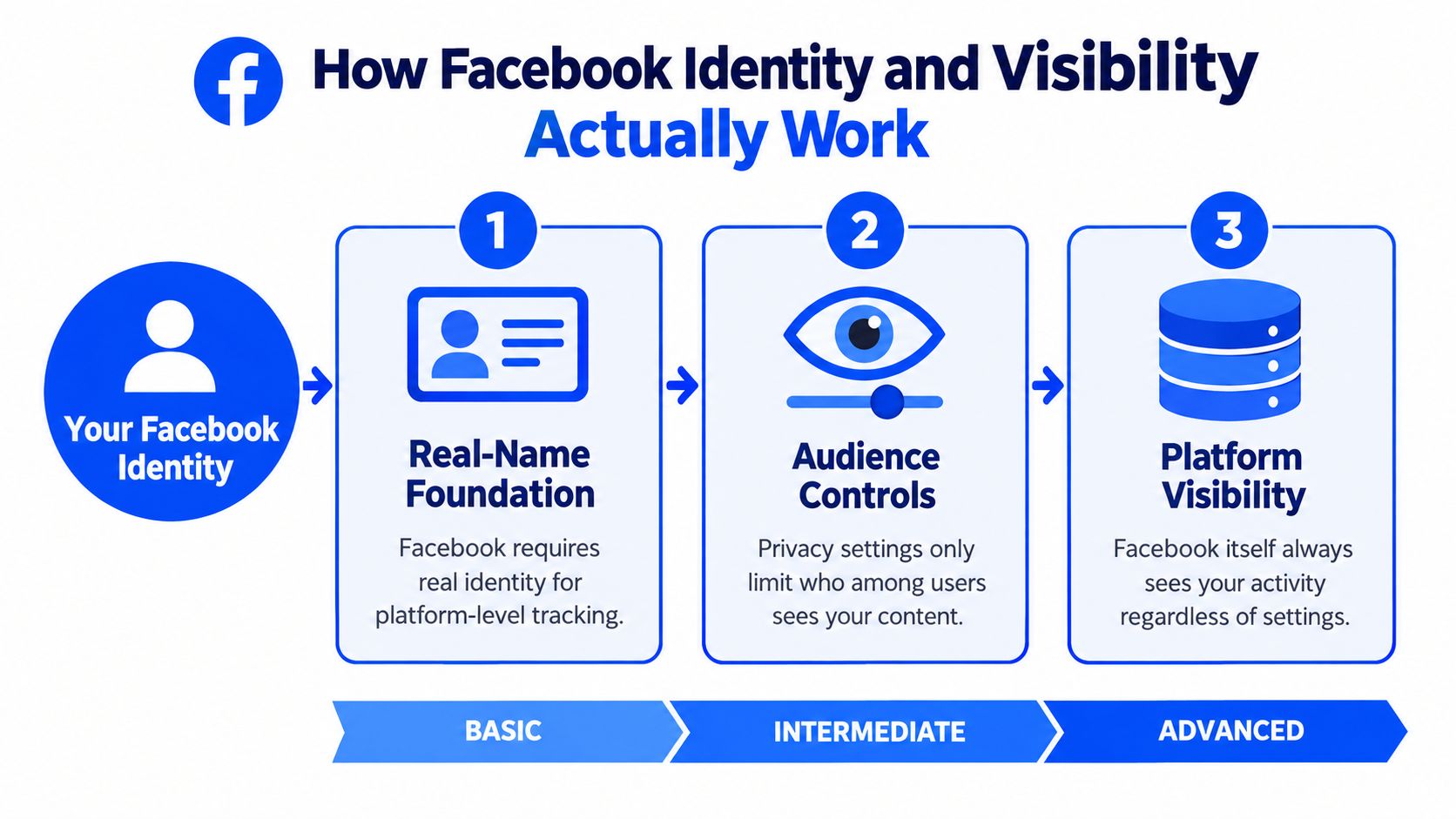
Facebook privacy becomes easier to understand once you separate two questions that sound similar but work very differently: who other people can see, and what Meta can still trace. Those are not the same system. They are more like a front door and the building's security desk. You can close the door to visitors while the desk still logs who entered.
Named accounts are the starting point
Facebook's account system is built around everyday identity, not throwaway pseudonyms. Its help materials say people should use the name they go by in daily life, and Facebook may ask for confirmation if a name is challenged or an account triggers review.
That design choice matters because every privacy setting sits on top of that account foundation. You can limit who sees your posts, hide contact details from profile visitors, or reduce search visibility. Those controls change exposure to other users. They do not turn the underlying account into an unlinked persona inside Facebook's systems.
A good way to picture it is a name badge at a conference. You can put on a jacket so fewer attendees can read the badge from across the room. The event organizer still knows who checked in.
Audience controls manage viewers
Facebook gives users many ways to narrow an audience. You can choose who sees a post, who can find parts of your profile, and in some cases whether your activity is visible in a given space. A technical analysis of Facebook-style privacy architecture explains the core limit clearly: these controls adjust disclosure to other people, while the platform keeps the account relationship available for moderation, enforcement, and recovery (technical privacy report).
That distinction is where confusion usually starts. If a profile looks quiet, many readers assume it has become hard to trace. What usually changed is visibility, not traceability.
For job seekers, that difference is practical. Public scraps of profile information, tagged photos, comments, and group activity can still shape how outsiders interpret an account, which is why a social media screening guide 2026 is a useful companion to Facebook privacy settings.
Platform traceability comes from metadata and account signals
Meta's own integrity and privacy documentation says its systems collect signals such as IP address and operating-system information (Meta privacy within integrity systems). That means an action can be hidden from other users in a limited context while still remaining attributable inside the platform.
In practice, traceability can come from several layers at once. Login history, device details, session timing, recovery information, and patterns that connect one account to another all help Meta tie activity back to an account. This is why “anonymous on Facebook” usually means “less visible to other people,” not “untraceable to Facebook.”
Use this quick checklist to sort your threat model before changing settings:
- Hiding from acquaintances, coworkers, or the public? Focus on profile fields, post audience, tagging, and search visibility.
- Hiding from group members? Check whether the group supports anonymous posting, and remember admins and Facebook may still know the author.
- Reducing platform traceability? Facebook is a poor fit for that goal because account, device, and session signals still exist.
- Trying to solve phone verification or account recovery rather than anonymity? Review the trade-offs on this Facebook verification page.
The practical takeaway is simple. Facebook can help you narrow your audience. It does not stop Meta from keeping logs that connect the account, the session, and the action.
Common Misconceptions That Break Your Privacy
Most failed attempts at anonymity on Facebook come from believable myths. Each myth contains a small truth, which is why people rely on it too much.
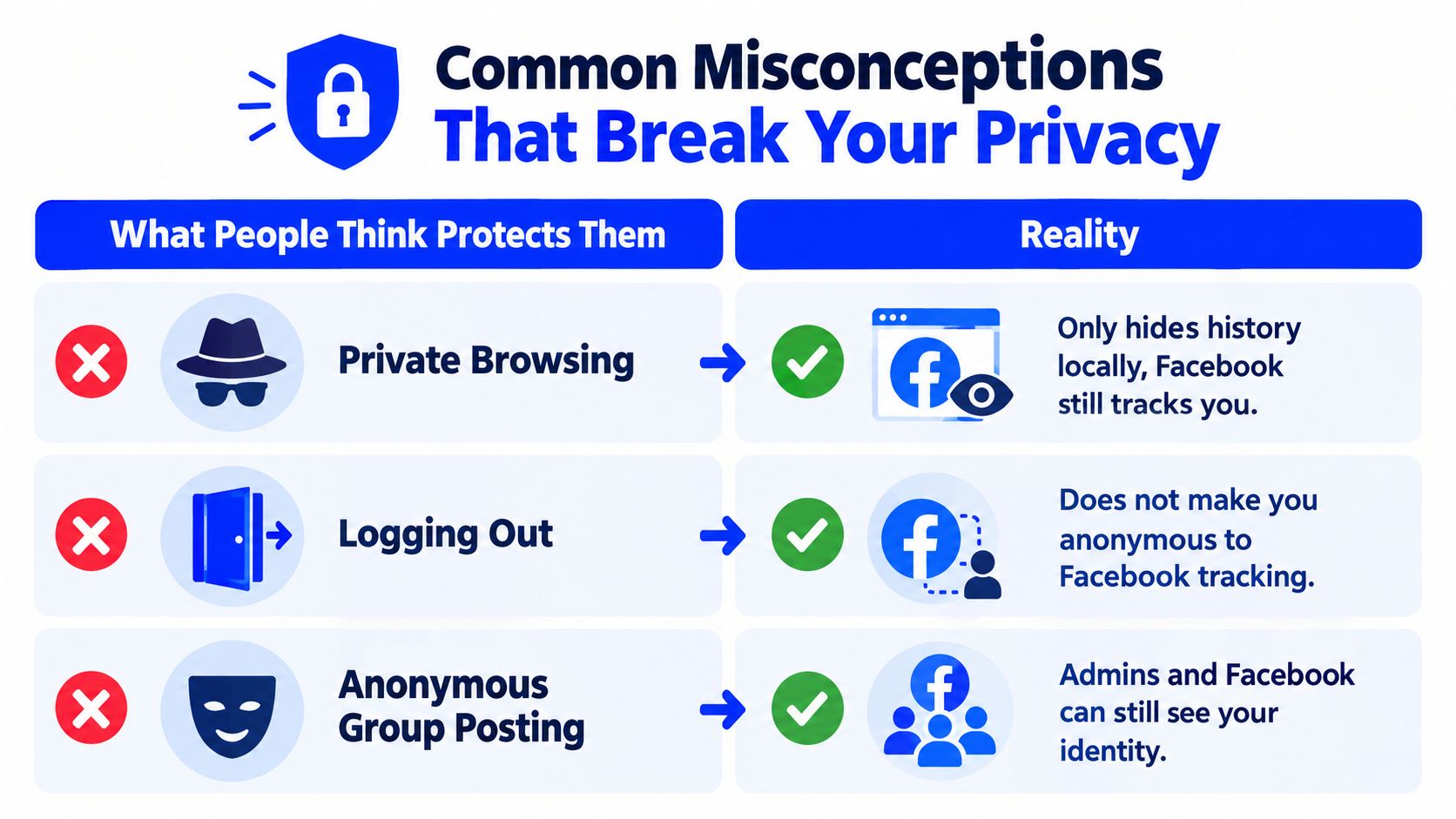
Myth one: Private browsing makes Facebook anonymous
Private browsing helps with local privacy. It can reduce what stays on the device after a session. But guides discussing anonymous Facebook browsing note that this doesn't make activity anonymous to Facebook itself, especially once someone interacts with the platform or moves behind the login wall (anonymous Facebook browsing guide).
Why it feels true: the browser window looks separate.
What happens: the local browser and the platform are different observers.
Myth two: Anonymous group posting hides the author from everyone
Some Facebook groups can enable anonymous posting, and that sounds broader than it is. Recent coverage explains that these posts are limited to groups that enable the feature, often go through admin moderation, and still reveal the poster's identity to admins and Facebook (guide to Facebook anonymous posting).
Why it feels true: the post appears masked to the group audience.
What happens: the mask only applies to part of the audience.
Key takeaway: Visibility controls can hide content from other users without removing the platform's ability to connect that content to an account.
Myth three: Hiding a phone number means Facebook doesn't have it
A profile can hide a number from visitors while Facebook still retains that number for account functions if it was provided for signup, security, or recovery. This is one of the biggest privacy misunderstandings because people confuse profile display with platform possession.
Why it feels true: the number isn't visible on the profile.
What happens: the public card is hidden, but the filing cabinet still contains it.
Who You Are Hiding From and What They Can Still See
Privacy works better when the reader names the observer first. “Who is the threat?” is a more useful question than “What is the private setting?”

Acquaintances and unwanted personal attention
For ex-partners, coworkers, classmates, or casual searchers, audience controls often help a lot. Limiting who can see posts, reducing profile details, tightening friend visibility, and disabling easy search pathways can lower exposure.
But discoverability leaks still happen through behavior. A distinctive photo, a recurring location, the same handle used elsewhere, or a recognizable writing style can reconnect the account to the person behind it.
Advertisers and data brokers
This threat model is different. A tighter profile may hide details from other users while doing far less against platform-side inference and broader ad-tech linkage. Device information, session patterns, and account-adjacent data can still contribute to identification and profiling.
The key mistake here is using a people-facing setting to solve a systems-facing problem.
Platform enforcement and legal demands
Anonymity on Facebook reaches a hard limit. Facebook's account and metadata structure means that account activity remains tied to platform systems even when a post is hidden from ordinary viewers. Settings that work against nosy acquaintances won't create operational anonymity against account enforcement.
A lock on the front gate helps against passersby. It doesn't erase the property records.
A quick threat-model checklist
- If the concern is acquaintances: focus on profile fields, audience defaults, tag review, and searchability.
- If the concern is cross-account linkage: reduce stable identifiers, keep browsing contexts separate, and avoid reusing obvious identity clues.
- If the concern is platform traceability: accept that Facebook settings won't remove it. Only participation choices can limit what enters the system.
Practical Controls to Reduce Visibility on Facebook
Privacy on Facebook works best as a layered hygiene routine. No single switch creates anonymity, but several small controls can reduce exposure.
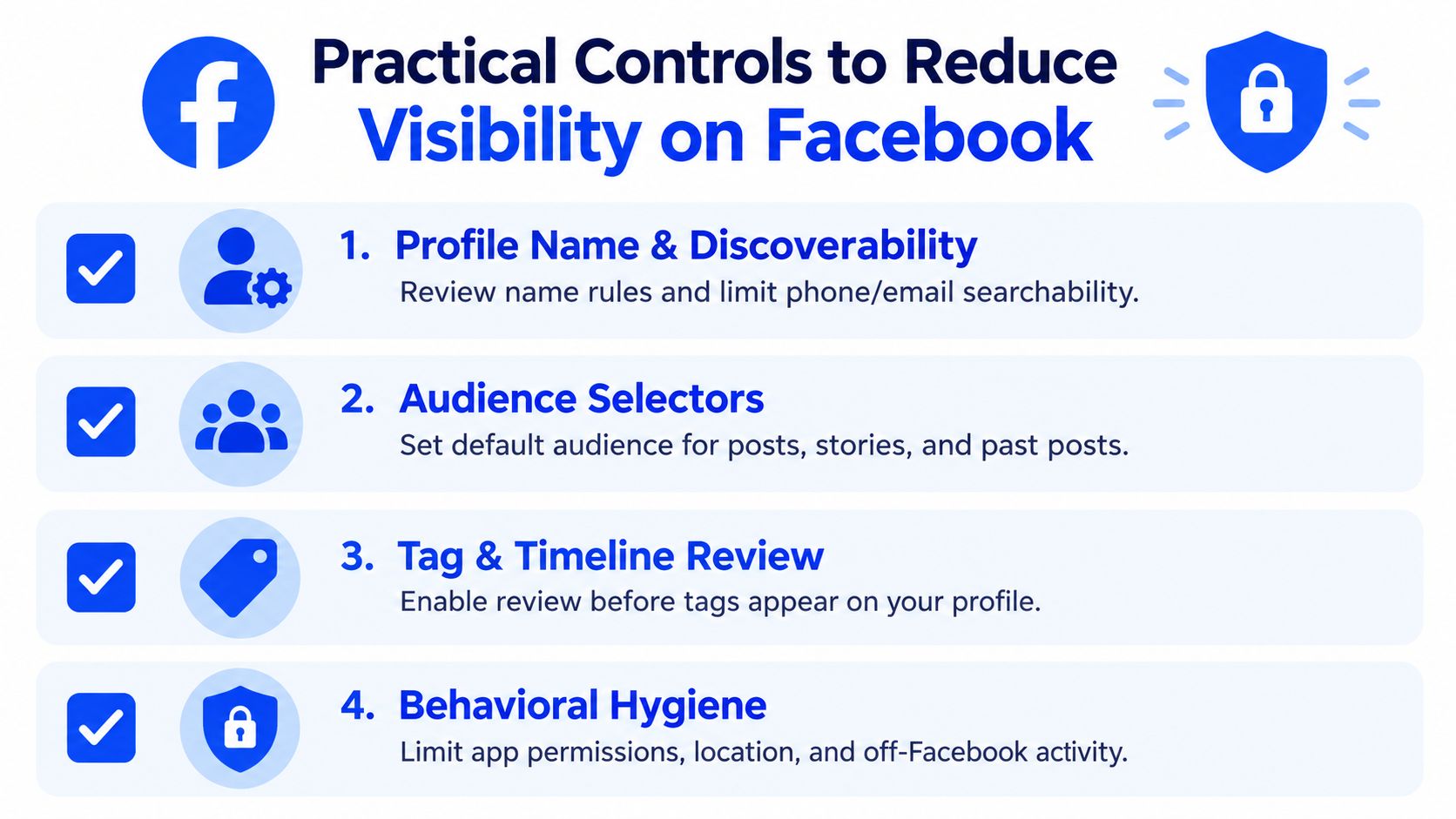
Start with profile identity and discoverability
Facebook's name policy matters here because readers shouldn't try to solve privacy by misrepresenting identity. The safer route is to reduce what the profile reveals around that identity, not to fake the identity itself.
Check these first:
- Profile fields: Remove or minimize optional details that make the account easy to identify.
- Phone and email visibility: Hide contact details from profile visitors if they don't need to be public.
- Search pathways: Review whether people can find the profile through contact information.
Quick check: View the profile as a non-friend or from a separate browser session and see what a stranger can learn in under a minute.
For readers comparing broader “ghost mode” ideas across platforms, this plain-language invisibility settings guide is a useful companion because it separates appearance management from actual traceability.
Adjust content audiences and review settings
Post privacy often matters more than profile privacy. Set the default audience carefully, and review past posts if old public content still exposes too much. Also check timeline and tag review settings so other people can't attach the account to content without review.
A short walkthrough helps more than theory here:
- Set a tighter default audience for future posts and stories.
- Review past public posts and limit old visibility where needed.
- Turn on tag review so mentions don't appear automatically.
- Check group posting options carefully. Anonymous or nickname-style features only apply in limited contexts and don't equal full privacy.
This video gives a visual walkthrough of common Facebook privacy controls:
Quick check: After changing settings, test one new post with the audience selector and confirm the icon before publishing.
Change behavior, not just settings
Many accounts become identifiable through habits rather than profile fields. Reused photos, linked Instagram-style bios, event check-ins, and posting from the same communities can reveal who is behind the account.
A practical rule is to separate contexts where possible. Different browser profiles, fewer connected apps, less location sharing, and less reuse of stable identifiers all reduce linkage risk. These steps don't promise anonymity. They make accidental exposure less easy.
| Control | Helps Against Other Users | Helps Against Platform Tracking |
|---|---|---|
| Limit profile details | Yes | Little |
| Restrict post audience | Yes | Little |
| Tag and timeline review | Yes | Little |
| Separate browsing contexts | Sometimes | Somewhat |
| Reduce stable identifiers | Sometimes | Somewhat |
Quick check: Search the profile from outside the normal logged-in session and compare what's visible before and after changes.
Phone Numbers Verification and Recovery Trade Offs
Phone numbers create a second layer of confusion because people mix up signup, two-factor authentication, and account recovery. They aren't the same task.
Signup isn't the same as recovery
A person creating a new Facebook account may explore whether a personal number needs to be exposed at all. That topic is covered in the existing guide to creating a new Facebook account without a phone number, so there's no need to repeat that walkthrough here.
Recovery is different. Facebook's help flow says to enter a mobile number or email, and if that fails, use the account recovery page from a computer or phone that was previously used to log in. A different new number doesn't automatically recover an existing account tied to an older number (Facebook account recovery help).
When recovery is the problem, the first move should be Facebook's official recovery path, not a new verification number.
SMS codes are one method, not proof of ownership
Facebook's two-factor settings let users choose Text message (SMS), select a phone number already on the account, or add a new phone number before receiving codes. That shows SMS is a specific 2FA method. It isn't proof that the number is a permanent line, and it doesn't mean voice-call support exists (Facebook 2FA help).
That distinction matters when someone is deciding between a long-term personal number and a secondary SMS option.
When a secondary number fits, and when it doesn't
A secondary number may fit a narrow need such as receiving an SMS during supported account setup, while exposing less personal contact information to other users. It won't bypass Facebook rules, identity checks, account restrictions, or unsupported number-type rules. It also shouldn't be treated as a substitute for a recovery method the account owner controls long term.
In that limited verification scenario, LineVerifier provides supported SMS verification offers for selected services and countries, with availability and terms depending on the offer shown on the site. The right standard is simple: use a secondary number only when it fits the exact task, and maintain recovery options that remain under the account owner's control.
Choosing Your Level of Privacy and Next Steps
The practical answer to anonymity on Facebook is modest but useful. A person can often reduce visibility, sometimes reduce discoverability, and rarely reduce platform traceability in any meaningful way.
Three privacy levels usually cover most needs:
- Basic visibility reduction: tighten profile fields, audience defaults, and tag review.
- Stronger separation: reduce searchability, separate browsing contexts, and avoid identity clues that reconnect the account across platforms.
- High sensitivity situations: accept that Facebook may not be the right place for anonymous participation at all.
A short audit helps:
- Profile: Is the profile revealing more than it needs to?
- Audience: Are default post and story audiences set deliberately?
- Discoverability: Can strangers find the account through contact details or obvious cross-platform clues?
- Recovery: Does the account owner control stable recovery methods?
Readers comparing SMS options for privacy-focused verification can also review the broader temporary phone number for verification guide. The safest long-term habit is simple: follow Facebook's identity rules, use privacy settings for what they do, and keep recovery methods current.
LineVerifier offers paid SMS verification options for supported services and countries, which can help when someone wants to avoid putting a personal number into a new account setup flow. It doesn't promise platform acceptance, recovery success, or anonymity, but it can fit a narrow verification task when the offer terms match the reader's need. Readers who want to compare current options can visit LineVerifier.